The short version
- Captions carry the speech and the sounds you need in order to follow a video, in time with the picture.
- Under WCAG, prerecorded synchronized media needs captions at Level A and live synchronized media at Level AA, within the scope and exceptions the standard sets out.
- Automatic output is a draft. Names, timing, speaker changes and meaningful sounds need a person.
- A transcript does work captions cannot: it can be read, searched, quoted, and used to jump to a moment in the recording.
- We build captions and transcripts from one timed source, so a single correction reaches both outputs.
1. Captions, subtitles and transcripts are close relatives, not twins
Captions are text in sync with a video, covering the speech and the non-speech audio you need in order to follow what is happening. They can name the speaker and describe a sound that matters. Subtitles usually mean a translation for a viewer who hears the original audio and does not understand the language. A transcript is a document. It suits audio-only material, and it serves reading, search, quotation and navigation.13
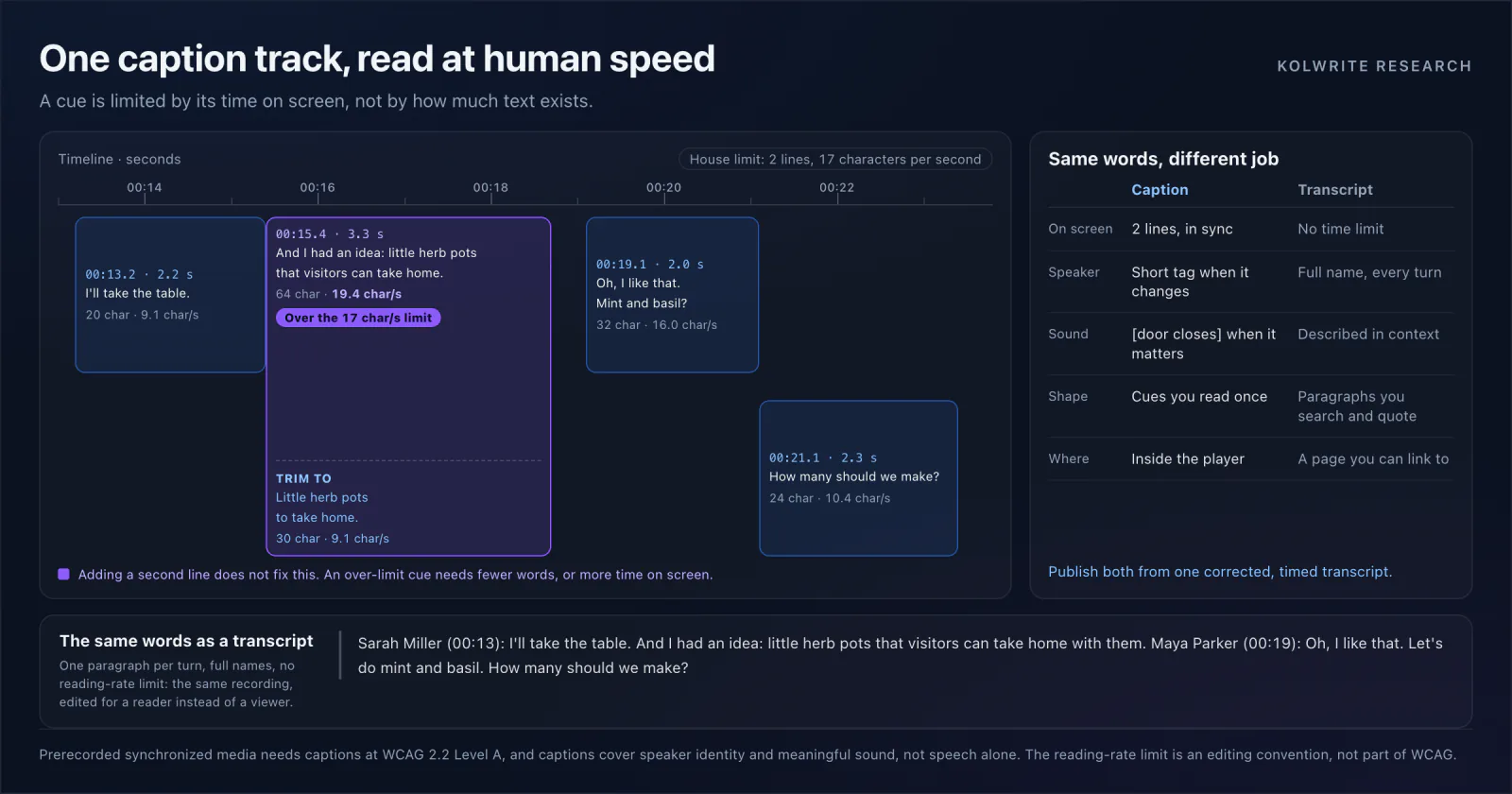
One corrected, timed source can feed all three outputs. The editing is not the same. A transcript can hold paragraphs and context. A caption has to fit a short line, arrive on the right frame, and stay off any text already burned into the picture.
2. What the standard actually asks for
W3C guidance places captions for prerecorded video whose audio is necessary at Level A, and captions for live synchronized media at Level AA. Captions cover dialogue, who is speaking, and meaningful sound effects, not speech alone. What the law requires of you depends on your country and on what you publish. WCAG is a technical standard, not legal advice.21
The difference is practical. A transcript link under a video is not the same experience as captions running in time with it. The reverse holds too: captions inside a player give an audio-only listener nothing to read, search or quote. We settle the media type and the user need first, then pick the format.
3. The audience is larger than a compliance checklist
The World Health Organization reports that about 1.5 billion people live with some degree of hearing loss, and that around 430 million of them need rehabilitation services. Captions are also read in a noisy bar and a silent office, in a classroom, by people watching in a second language, and by anyone who cannot turn the sound on right now.41
Text opens routes that audio does not. It can be searched, quoted, translated, enlarged and read at whatever pace suits the reader. W3C describes interactive transcripts that highlight the phrase being spoken and move playback to the point a reader selects.3
4. Why automatic captions still need an editor
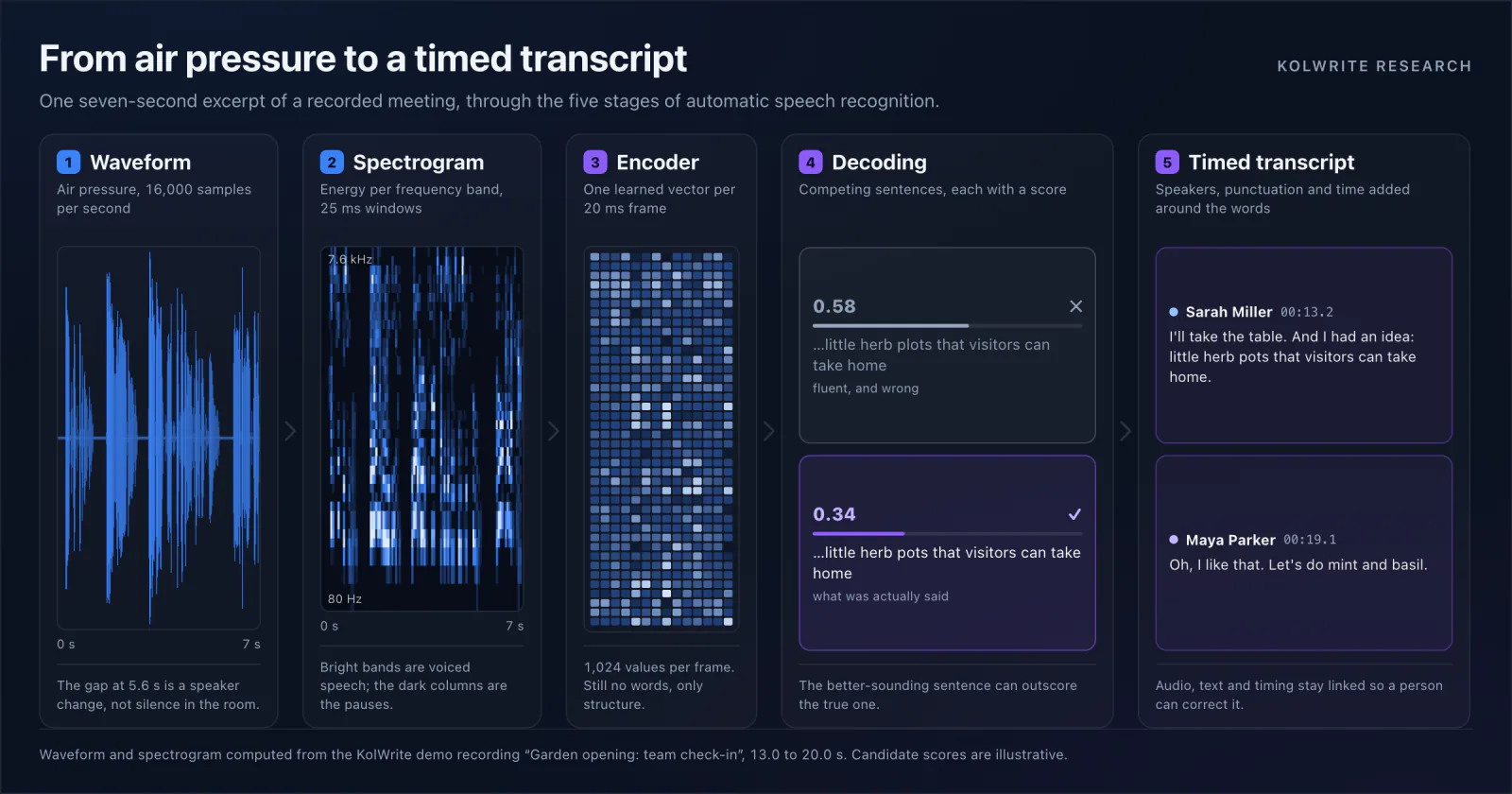
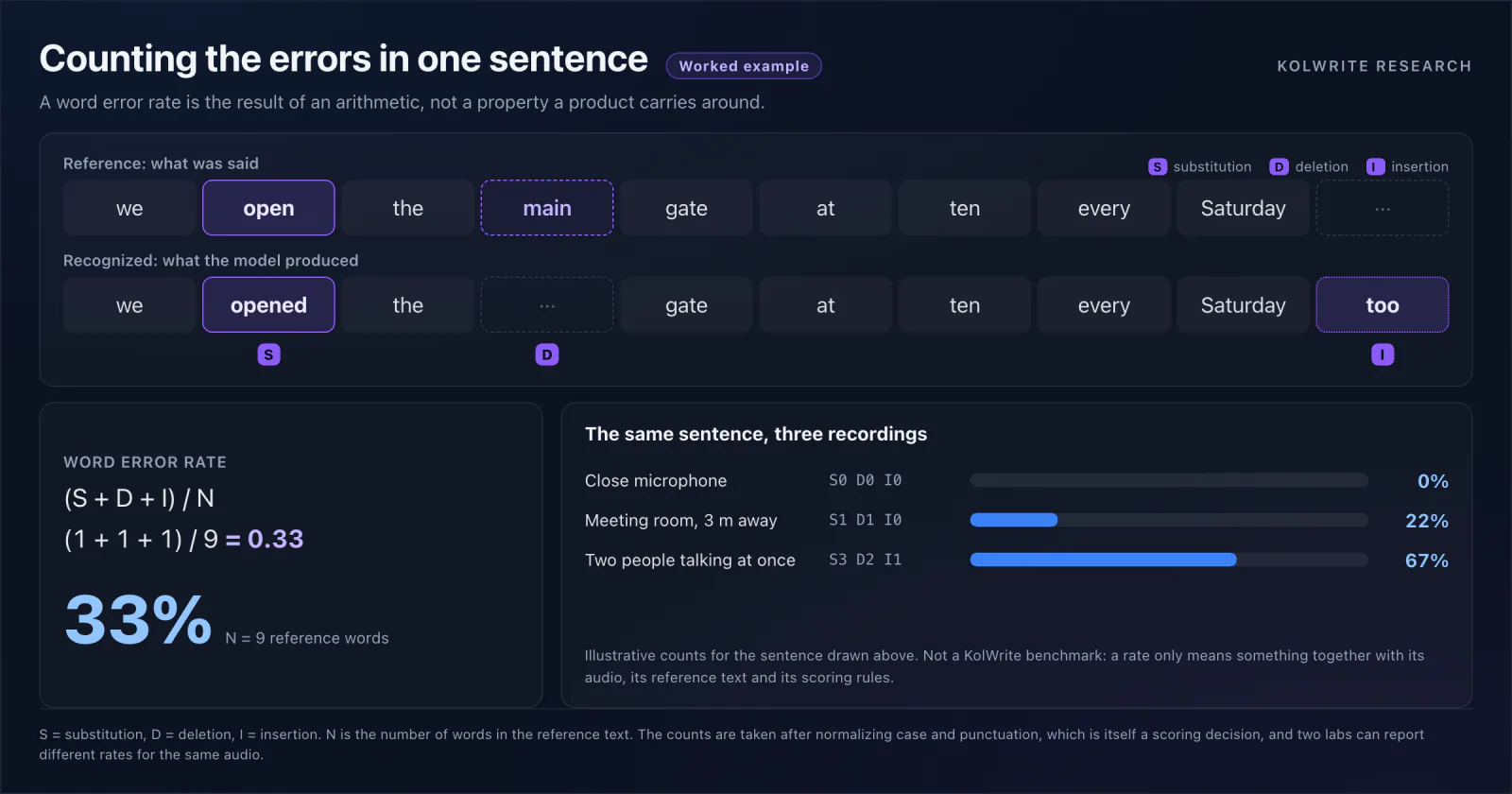
Automatic recognition saves most of the typing. It does not know which mistake matters. A wrong surname, a lost negation, a swapped number or a misplaced speaker change can reverse the meaning of a scene. Sounds that carry meaning may not appear in a speech transcript at all. W3C practical guidance says plainly that automatically generated captions usually need editing.1
We review against the audio, not against a spellchecker. Check the first and last seconds, where content tends to be cut. Verify names and numbers. Mark speaker changes. Add the sounds a viewer needs. Then watch the finished video and check cue length, reading time, contrast, and whether a caption sits on a name already on screen.
5. The checklist we use before publishing
Keep one corrected master with word or segment timing, and derive the caption and subtitle files from it. Keep the original media and the revision history. Test the export in the player your audience will actually use. An SRT file can be perfectly valid and still unreadable at the speed it plays.
KolWrite is built around that shared timed source. Edit the text beside playback, fix the speaker and language details, then export the format the audience needs. An export button does not make a video accessible. The finished experience does, and that still costs a person a few minutes per clip.
Common questions
Are subtitles and captions the same thing?
They often share a file format, and the words can be identical. Captions exist to give speech and meaningful sound to someone who cannot hear the audio. Subtitles usually translate dialogue for someone who can. The terms are used differently from country to country.
Do automatic captions meet WCAG without review?
Compliance depends on whether the final captions are accurate and complete, not on how they were produced. Automatic output is a good start, and names, timing, speaker identity, missing passages and meaningful sounds still need review.
Does a transcript replace captions on a video?
Usually not. Prerecorded video whose audio is necessary calls for synchronized captions under WCAG. A transcript is worth publishing alongside them, and for audio-only material it can be the main deliverable.
How long should a caption line be?
Short enough to read before it leaves the screen. We measure the real reading time rather than the character count alone, and split a cue when a sentence runs past what a viewer can take in at that pace.
Sources and further reading
Primary research and standards used for this article. Links open the original publication.