Premiere Pro
Select KolWrite to open the panel inside Premiere Pro.
Install guide KolWrite
Theme
KolWrite for Creators
The KolWrite panel for Adobe Premiere Pro and DaVinci Resolve generates word-by-word captions in 100+ languages, removes silence, and runs AI edits. Only your audio ever leaves your computer.
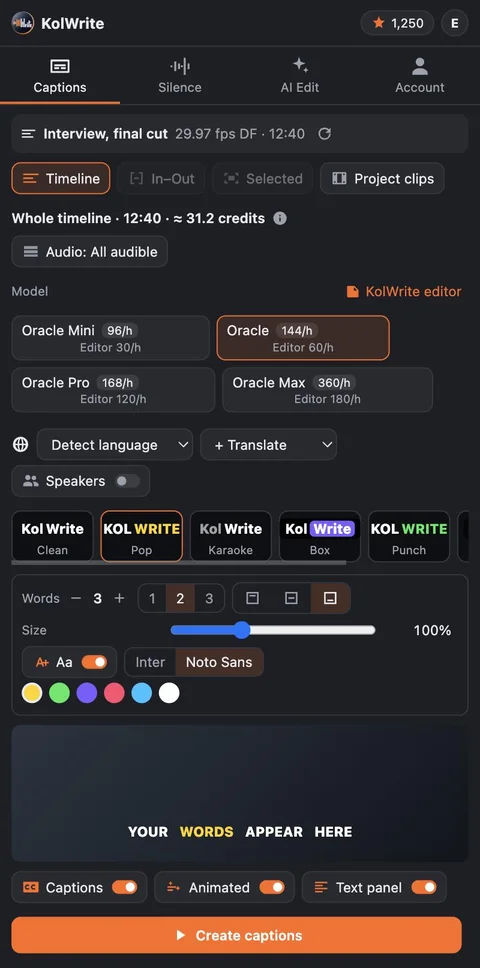
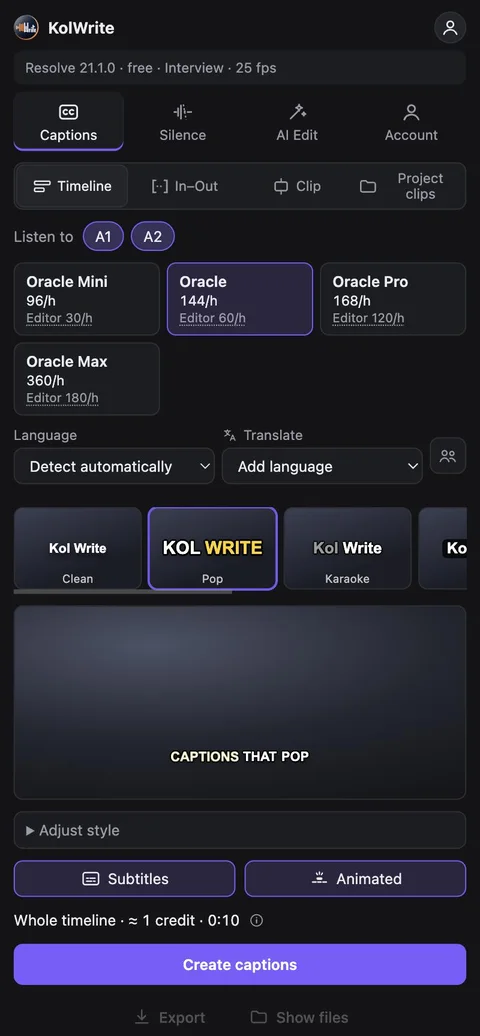
Once it's installed, restart your editor and open the panel from this menu.
Select KolWrite to open the panel inside Premiere Pro.
Install guideOpens in its own window inside Resolve.
Install guideOpens in your browser and connects to Resolve.
Install guideMenu names match the English interface. Don't see it in the menu? Restart your editor once, then check the Troubleshooting section in the guide.
There is one installer for each operating system, and it sets up the panel in every supported editor on your machine.
Installs both panels
KolWrite-for-Creators-1.0.5.dmg
Installs both panels
KolWrite-for-Creators-1.0.5-Setup.exe
DaVinci Resolve only
KolWrite-for-Resolve-1.0.5-linux.zip
| Editor | System | File |
|---|---|---|
| Premiere Pro | macOS / Windows | KolWrite-for-Premiere-1.0.5.ccxCreative Cloud plugin file |
| DaVinci Resolve | macOS | KolWrite-for-Resolve-1.0.5-macos.pkgPackage |
| DaVinci Resolve | Windows | KolWrite-for-Resolve-1.0.5-windows.exeInstaller |
| DaVinci Resolve | Windows | KolWrite-for-Resolve-1.0.5-windows.zipZIP archive |
| DaVinci Resolve | Linux | KolWrite-for-Resolve-1.0.5-linux.zipZIP archive |
If your operating system warns you that the installer is from an unknown developer, verify the file against the SHA-256 checksums and follow the install guide.
Get word-level timing across 100+ languages and edit native captions right on your open timeline.
Detects pauses locally on your computer and creates a new sequence with the silences removed, leaving your original sequence intact.
Strips out filler words and repetitions, trims to a target length, or pulls a short with a hook. You approve every cut before it happens.
Right-to-left captions keep proper word order and punctuation, even when a line mixes Hebrew and English.
Because Premiere and Resolve decode your footage, the panel hears whatever you hear on the timeline, including multichannel files, external recorder audio, and nested clips.
Captions snap cleanly to frames at 23.976, 29.97 drop-frame, and other frame rates, including timelines starting at 01:00:00:00.
The panel has your editor bounce an audio-only mixdown of what you hear, compresses it down to speech quality on your machine, and uploads just that file. Your video files are never read for upload.
Read the Privacy PolicyYou pay with KolWrite credits per hour of audio, and you only pay for the audio you actually send. Any KolWrite account works, including a free one.
credits per audio hour
| Model | In the panel | In the KolWrite editor |
|---|---|---|
| OracleProduction captions | 144 | 60 |
| Oracle ProDemanding audio | 168 | 120 |
| Oracle MaxDifficult audio, important edits | 360 | 180 |
You can cancel for free any time before your audio reaches KolWrite. Once it arrives, the full job is billed. If a job ever fails on our end, you aren't charged.
Grab the installer for your operating system, either macOS or Windows. It will install the KolWrite panel for Premiere Pro, DaVinci Resolve, or both if you have them. For Linux, there is a dedicated DaVinci Resolve package. If you just want individual files, check under Other downloads.
Installing the panel is free. You pay for transcription using KolWrite credits per hour of audio. You'll see the exact credit cost for each model in the table above and right in the panel before you start a job. Any KolWrite account works, including free accounts.
No. The panel gets an audio-only mixdown from Premiere Pro or DaVinci Resolve, compresses it locally on your machine, and uploads only that audio file. Your video files are never read for upload.
We support Premiere Pro 25.6 and newer on macOS and Windows, plus DaVinci Resolve 20 and newer on macOS, Windows, and Linux. Both the free version of Resolve and Resolve Studio are supported.
Yes. Right-to-left captions keep the proper word order and punctuation, even when a line mixes Hebrew or Arabic with English. You can also switch the panel interface itself to Hebrew or Arabic.
Captions are added directly to your current sequence or timeline, where you can edit them. Silence cuts and AI edits create a separate sequence or timeline and preserve the original edit.
You can cancel for free until your audio reaches KolWrite. Once it does, you're charged for the full audio length. The panel always shows the exact credit cost and asks you to confirm first. If a job fails on our end, you aren't charged.
KolWrite transcribes over 100 languages, including Hebrew and Arabic. You can pick the language yourself or leave it on automatic, and you can also add translated caption tracks.
Yes. Along with putting captions in your timeline, the panel saves SRT, VTT, TXT, and JSON files to whatever folder you pick.
Install the panel, sign in with any KolWrite account, and caption a short sequence. You'll see the credit estimate before the job starts.
Adobe and Premiere Pro are trademarks of Adobe. DaVinci Resolve is a trademark of Blackmagic Design. KolWrite is an independent product and is not affiliated with or endorsed by either company.