The short version
- Make sure you're allowed to record before worrying about the setup. Consent laws depend on the country, who is on the call, and why you're recording.
- Some phones include a built-in call recorder, depending on your phone model, software version, and country.
- Putting the call on speakerphone and recording with a second device works almost everywhere, though the audio won't sound as good.
- Calls made through messaging or video apps require a different setup than regular phone calls.
- A written transcript is much easier to read through and share than a long audio file.
Are you allowed to record a phone call?
That's a legal question, and the answer depends on where you are, who's talking, and the purpose of the recording. Some countries let one person on the call record without telling anyone else. Other places require everyone's consent. Workplaces, schools, and regulated professions often have their own policies on top of the law.
In Israel, several rules come into play. You have the general privacy and wiretapping laws, along with a newer amendment covering recorded calls between businesses and consumers for specific transactions. That amendment only covers certain cases rather than every business call, and our guide to call-recording law goes into the details. This article only gives general information and does not replace legal advice. Talk to a lawyer first if a recording might be used in a dispute, a workplace procedure, or court.
You can avoid most trouble with one simple habit. At the start of the call, say that you're recording and explain why. Once the other people agree out loud, you have their consent right there on the recording.
Can your phone record calls on its own?
Sometimes it can. Newer iPhone software and many Android models let you record right from the Phone app. Doing this usually triggers a spoken announcement or an on-screen notice so the other person knows. Whether you have this feature depends on your phone model, software version, and country. Since updates can change this, look in your phone's settings rather than trusting a list online.
The operating system restricts third-party recording apps, so a standard app on iPhone or Android generally cannot record the other side of a regular cellular call. Be careful with any app that claims it can. These apps usually route your call through an outside server, raising privacy concerns. Before you place a call through an app, check what it does with your audio.
What works on almost any phone?
You can always put the call on speakerphone and record it with a second device sitting nearby, like another phone, a voice recorder, or a laptop. It works regardless of your phone or network. You do lose audio quality, though, because the other person's voice has to come out of a tiny phone speaker and travel across the room to your microphone.
To get a recording you can actually use, go into a quiet room and shut the door. Set the phone on a soft surface so it doesn't vibrate against the table, and place your recorder right next to the phone's speaker. Turn the volume up high, just short of distorting. Do a quick test call with a friend beforehand and listen back with headphones.
How do you record calls made in apps?
Messaging and video apps handle audio themselves instead of using your phone's dialer, and many don't include a record button. Taking the call on a computer lets you record the system audio directly. On a Mac, KolWrite can capture the computer's internal audio so both sides of the conversation come through clearly. If you have to take the call on a phone, stick with the speakerphone setup described above.
If an app does have its own recording feature, it will usually notify everyone on the call. Use that option whenever it's available, since it captures even volume levels for all participants.
How do you get a clear recording?
Good call audio starts with a solid connection. Stay on a stable network, and don't try to record while driving or walking in the wind. If you aren't using speakerphone, use wired earphones or a reliable wireless pair. Ask everyone to speak one at a time. When names or numbers come up, say them slowly and spell out anything tricky, like a surname, street name, or order number.
Right after hanging up, make sure the file saved properly and play a bit of it back to check the sound. Give the file a clear name with the date and the person or company so you can still find it months from now.
What do you do with a recorded call?
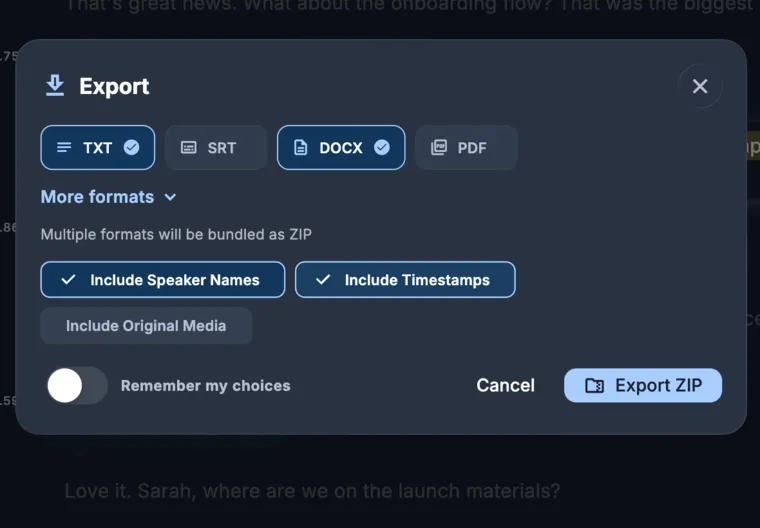
Working with an audio file on its own is tedious, and few people have time to replay a forty-minute call just to track down one sentence about a delivery date. If you upload the recording to KolWrite, you get a transcript with timestamps and speaker labels. Clicking any line plays that exact moment from the call. From there, you can ask questions about the conversation right in the app, or export the text as a TXT, DOCX, or PDF file.
Automated transcripts make mistakes, especially on names, numbers, and addresses, and phone audio is tough to begin with. Double-check important details against the original audio before counting on the text or sending it to someone else. Store both the recording and the transcript as carefully as any other private record, and delete them once you no longer need them.
Common questions
Is it legal to record a phone call in Israel?
That depends on who is recording, who else is on the line, and the reason for the recording. Certain business-to-consumer calls also fall under specific rules. Because this article only gives general information and not legal advice, you should speak with a lawyer if the recording is important.
Does the other person have to know?
Laws vary, so it is a safe, polite habit to let the other person know. Just mention that you are recording at the start of the call and explain why.
Can I record a WhatsApp call?
Most messaging apps don't give regular users a built-in way to record calls. If you use a computer, you can record the system audio. On a phone, put the call on speakerphone and record with a second device. Either way, the same consent rules apply.
Why does my recorded call sound so bad?
Phone networks compress audio heavily, and the person on the other end is often in a noisy spot. Using speakerphone with a second recorder also picks up room echo. You'll get much better results in a quiet room with the microphone right next to the phone's speaker.
Can KolWrite transcribe a call recording?
Yes. Upload your audio file and you'll get a transcript with speaker labels and timestamps. Just be sure to check names and numbers against the original recording, since automated transcription can get them wrong.